 Admin
Admin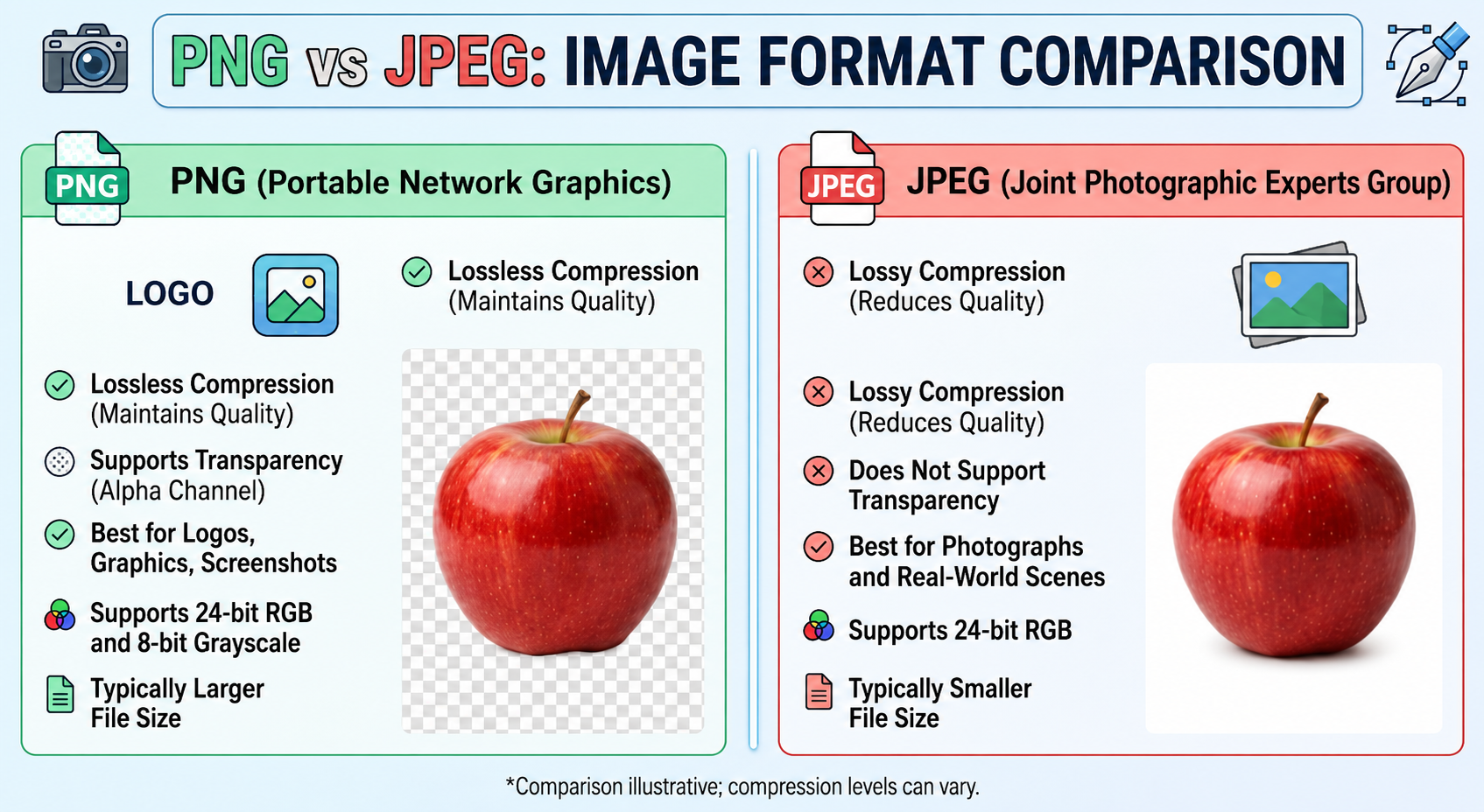
The comparison of png vs jpeg covers two of the most widely used image formats in digital media, and each one serves different purposes and follows different technical approaches. Both formats store and display images on websites, applications, and design platforms, but they handle image data, quality, and file size in very different ways. Understanding these differences helps you choose the right format based on whether you need high-quality graphics or smaller, optimized files for faster loading.
PNG preserves image quality and keeps every detail intact, which makes it ideal for graphics, logos, and images that need transparency. On the other hand, JPEG compresses images by reducing file size, which makes it suitable for photographs and web content where speed and storage efficiency matter most. This fundamental difference makes png vs jpeg a key topic in digital imaging and web optimization.
What is PNG?
PNG (Portable Network Graphics) is a popular image format that people widely use for digital graphics that require high quality and clarity. Developers created it to improve older formats by providing better image preservation and support for transparent backgrounds. One of the main strengths of PNG comes from its lossless compression, which keeps all image data intact when you save or edit the file. This feature makes it highly suitable for images where detail and sharp edges matter most.
People commonly use PNG for logos, icons, screenshots, and web graphics because it maintains crisp quality even after multiple edits. Unlike other formats that reduce image quality to save space, PNG keeps every pixel unchanged. However, this high-quality output often creates larger file sizes, which can slow down loading speed when used excessively on websites. Because of this balance between quality and size, users choose PNG when visual precision matters more than storage efficiency.
What is JPEG?
JPEG (Joint Photographic Experts Group) is one of the most widely used image formats in the world, especially for photographs and complex images. Developers designed it to efficiently compress image data so files take up less storage space while still maintaining acceptable visual quality. This makes JPEG extremely popular for websites, social media platforms, and digital cameras where users need to balance quality and file size.
The key feature of JPEG comes from its use of lossy compression, which reduces file size by permanently removing some image data that the human eye does not easily notice. While this helps make images lighter and faster to load, it can slightly reduce image quality, especially when users edit and save the file multiple times. JPEG works best for realistic images like photographs, landscapes, and portraits where slight quality loss does not stand out easily.
PNG vs JPEG Compression Differences
The main difference in the png vs jpeg comparison comes from how each format compresses image data. PNG uses lossless compression, which reduces file size without removing any image information. It preserves every detail of the original image, even after users edit and save it multiple times. This makes PNG ideal for graphics where precision matters, such as logos, text-based images, and digital illustrations.
JPEG, on the other hand, uses lossy compression, which reduces file size by permanently removing certain parts of image data that the human eye considers less important. This process significantly reduces file size and makes JPEG more efficient for storage and web usage. However, when users save a JPEG file repeatedly, its quality can gradually decrease over time. Because of this difference, people prefer JPEG for photographs and choose PNG for high-detail graphics where quality must stay intact.
Image Quality Comparison
When you compare png vs jpeg, image quality becomes one of the most important factors to consider. PNG delivers higher image quality because it uses lossless compression. It preserves every detail in the image exactly as the creator originally designed it. As a result, PNG images look sharper, clearer, and work better for graphics that require precision, such as logos, icons, and text-heavy visuals.
JPEG, however, provides slightly lower image quality because it uses lossy compression. Although users often do not notice this reduction in everyday photographs, it becomes visible when they compress or edit images multiple times. JPEG still remains widely used because it balances quality and file size effectively, especially for real-world images like portraits and landscapes where perfect sharpness does not matter as much.
File Size and Performance Impact
In the png vs jpeg comparison, file size plays a major role in deciding which format to use. PNG files are generally larger because they store image data without removing any details. This results in higher quality but also increases storage usage and can slow down webpage loading times if not optimized properly. For websites that use many images, large PNG files can significantly affect performance and user experience.
JPEG files are much smaller in size because of their lossy compression technique. By removing less noticeable image data, JPEG reduces file weight while still keeping the image visually acceptable. This makes JPEG highly efficient for web pages, blogs, and social media platforms where fast loading speed is important. In most cases, JPEG helps improve performance and SEO by reducing page load time, especially when dealing with multiple images.
Best Use Cases: When to Choose PNG or JPEG
Choosing between png vs jpeg mainly depends on the type of image and its intended use. PNG works best for graphics that need high clarity and transparency. Designers use it for logos, icons, UI elements, screenshots, and digital artwork where sharp edges and precise details matter. Because PNG preserves every detail, it becomes the ideal choice when image quality cannot be compromised, even if the file size gets larger.
JPEG works better for photographs and complex images that contain many colors and gradients. People widely use it in websites, blogs, social media posts, and digital photography because it keeps file sizes small while still maintaining good visual quality. This makes JPEG a practical option when performance and loading speed matter most. In simple terms, PNG works best for design and graphics, while JPEG works best for real-life images and fast web usage.
Conclusion
In the debate of png vs jpeg, there is no single winner because both formats serve different purposes. PNG is the preferred choice when image quality, sharpness, and transparency are important. It ensures that no detail is lost, making it ideal for logos, icons, and digital graphics that require precision. On the other hand, JPEG is designed for efficiency, offering smaller file sizes that help improve website speed and performance.
Understanding the strengths of each format allows you to make smarter decisions depending on your needs. If your priority is high-quality visuals, PNG is the right option. If you want faster loading times and optimized storage, JPEG is more suitable. Using the right format at the right time can significantly improve both user experience and SEO performance, making your digital content more effective.
FAQs
What is the main difference between PNG and JPEG?
The main difference in png vs jpeg is that PNG uses lossless compression, which preserves image quality, while JPEG uses lossy compression to reduce file size.
Which is better for website use, PNG or JPEG?
JPEG is generally better for websites because it has smaller file sizes, which helps pages load faster. PNG is used when high-quality graphics or transparency is needed.
Does PNG give better quality than JPEG?
Yes, PNG provides better image quality because it does not lose any data during compression, unlike JPEG which slightly reduces quality.
Why is JPEG more popular than PNG?
JPEG is more popular because it creates smaller files, making it ideal for photos, social media, and web content where speed and storage efficiency matter.
Visit for More information : Multiple Magazines