 Admin
Admin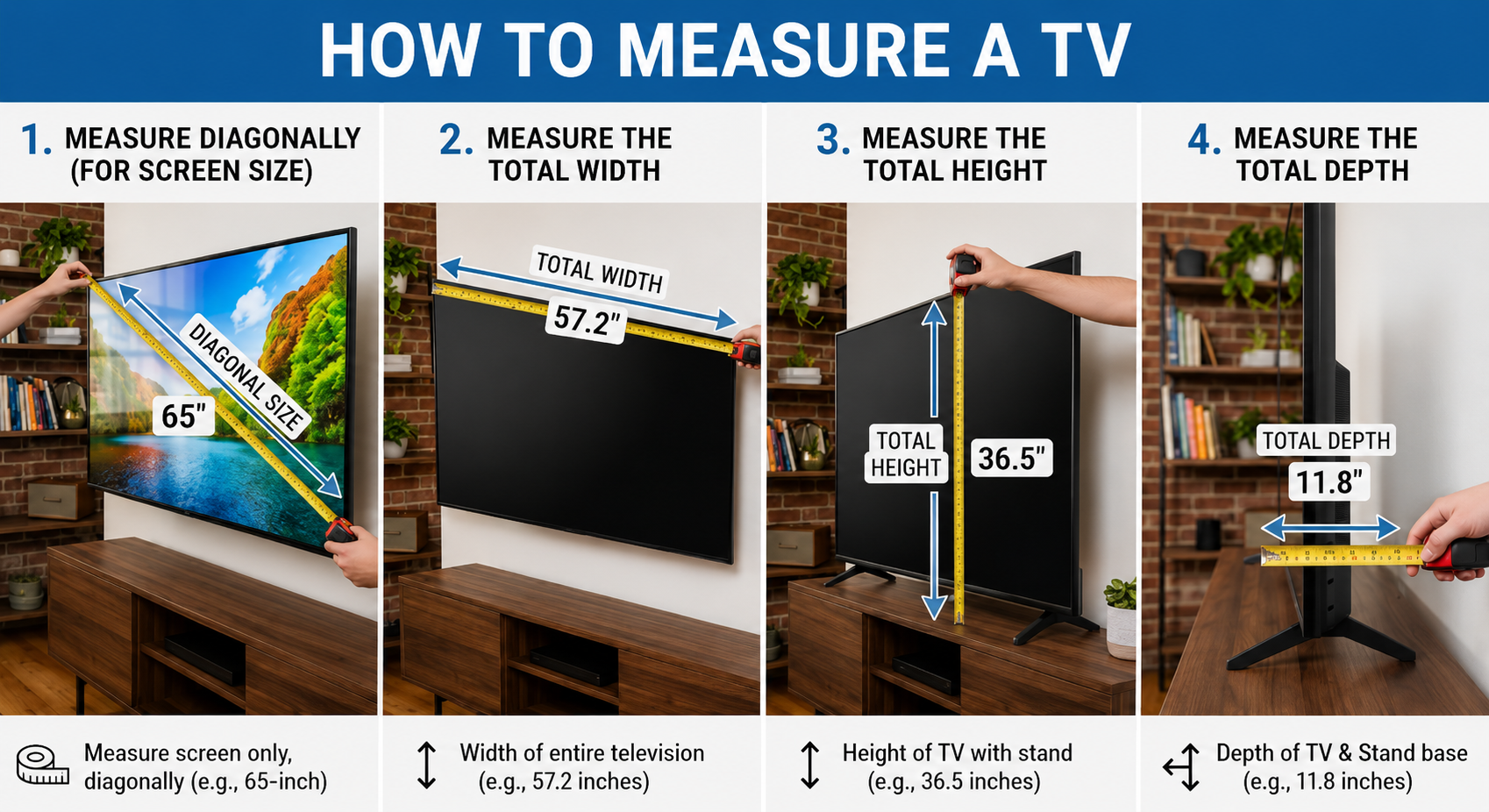
TV size refers to the diagonal length of the screen, not its width or height. When people try to understand how to measure a TV, they often make the mistake of measuring side to side, which leads to incorrect assumptions about the actual screen size. Manufacturers follow a universal standard where the screen is measured from one corner to the opposite corner, giving the size in inches. This method makes it easier to compare different models across brands, even if their shapes or borders differ slightly.
A “55-inch TV” does not mean the TV is 55 inches wide. Instead, it means the distance from the top-left corner of the display to the bottom-right corner of the screen is 55 inches. This diagonal measurement only includes the visible screen area and excludes the bezels or outer frame. Understanding this basic rule helps you avoid confusion when shopping and ensures you pick a TV that actually fits your room space and viewing needs.
Tools You Need Before You Start Measuring
Before learning how to measure a TV, you need a few simple tools that help you get accurate results without confusion. The most important tool is a measuring tape because it allows you to measure the screen diagonally as well as the width and height of the TV. A flexible tape works better than a rigid ruler because TV screens are large and require corner-to-corner measurement. You may also keep a notepad or your phone ready to record measurements so you don’t forget any numbers during the process.
It also helps to have a clean, stable surface or wall space where the TV is placed. This makes it easier to stretch the measuring tape properly without obstruction. In some cases, a helper can make the process more accurate, especially for larger TVs where holding one end of the tape alone becomes difficult. These simple tools ensure that you measure your TV correctly and avoid mistakes that can affect fitting, placement, or buying decisions later.
Step-by-Step Guide: How to Measure a TV Screen Correctly
To understand how to measure a TV correctly, start by identifying the visible screen area only. Turn off the TV and clean the screen so you can clearly see the corners. Place one end of your measuring tape at the top-left corner of the display and stretch it diagonally to the bottom-right corner. This diagonal line gives you the official screen size in inches. Make sure you do not include the plastic frame or bezel, as it is not part of the screen measurement.
Next, hold the tape steady to avoid bending or slack, because even a small shift can change the final reading. Write down the measurement carefully and double-check it once more for accuracy. If the TV is large, ask someone to help hold one side of the tape so it stays straight. This simple step-by-step process ensures you measure your TV correctly and match it with standard sizing used by manufacturers worldwide.
Measuring TV Width, Height, and Depth for Space Planning
When learning how to measure a TV, diagonal size alone is not enough if you want the TV to fit properly in your room. You also need to measure the width, height, and depth of the television. Width is measured from the left edge of the screen (including bezel) to the right edge, while height is measured from the top to the bottom of the full TV frame. Depth becomes important when you plan to place the TV on a stand or inside a cabinet, as it determines how far the TV will extend into your space.
These measurements help you avoid placement problems that many buyers face after purchase. For example, a TV may look perfect in inches but still not fit your wall space because the width is too large. Similarly, cabinets and shelves often require exact height and depth measurements to ensure proper installation. Taking all three measurements together gives you a complete understanding of the TV’s real physical size, making your setup more accurate and visually balanced in your room.
Common Mistakes People Make When Measuring a TV
Many people misunderstand how to measure a TV and end up taking incorrect measurements that affect their buying decisions. One of the most common mistakes is measuring the TV from edge to edge, including the bezel. This leads to confusion because manufacturers only measure the screen itself, not the outer frame. As a result, people often think a TV is larger or smaller than it actually is.
Another frequent mistake is measuring only the width and ignoring the diagonal size, which is the official standard used for TV sizing. Some users also stretch the measuring tape loosely, which gives inaccurate results. Even a slight bend in the tape can change the measurement enough to cause fitting issues. Additionally, people sometimes forget to consider the TV stand or wall mount space, which can lead to installation problems later. Avoiding these errors ensures you get an accurate understanding of your TV’s real size and prevents unnecessary inconvenience.
TV Size Chart: Understanding Inches vs Real Dimensions
When learning how to measure a TV, many people get confused because the inch size does not directly match the physical width or height of the screen. A TV labeled as 32, 43, 55, or 65 inches refers only to the diagonal measurement, not how wide the TV actually is. This is why two TVs with the same inch size can still look slightly different depending on their bezel thickness and design style.
To make things clearer, it helps to understand general size relationships. For example, a 32-inch TV is usually suitable for small rooms and measures around 28 inches wide, while a 55-inch TV can be roughly 48 inches wide. Larger models like 65 inches or more require significantly more wall or table space. These differences matter because room layout and viewing distance depend on real dimensions, not just the advertised screen size. Knowing this chart-like comparison helps you quickly estimate whether a TV will fit your space before you buy it.
Expert Tips for Choosing the Right TV Size for Your Room
When understanding how to measure a TV, choosing the right size for your room is just as important as taking accurate measurements. Experts recommend considering viewing distance first, because sitting too close to a large screen can cause eye strain, while sitting too far from a small TV reduces picture clarity. A simple rule is to match the TV size with how far you sit from the screen, ensuring a comfortable and immersive viewing experience.
Lighting and room layout also play a major role in selecting the right TV. A bright room may require a larger or higher-brightness screen to maintain visibility, while a smaller, darker room works well with mid-sized TVs. Wall space, furniture placement, and viewing angle should also be checked before finalizing your choice. These expert considerations help you go beyond basic measurement and ensure the TV fits both your physical space and your viewing comfort perfectly.
Conclusion
Understanding how to measure a TV correctly helps you make smarter buying decisions and avoid common sizing mistakes. The key idea is simple: TV size always refers to the diagonal length of the screen, not the width or height. Once you know this, you can easily compare different models, plan your room layout, and choose a screen that fits both your space and viewing comfort. Taking accurate measurements of width, height, and depth further ensures that your TV fits perfectly whether you mount it on a wall or place it on a stand.
A properly measured TV improves your overall viewing experience. It prevents overcrowding in small rooms and ensures large rooms don’t feel underwhelmed by a tiny screen. When you combine correct measurement techniques with smart space planning, you get a setup that looks clean, balanced, and comfortable for daily use.
FAQs
How do I measure a TV size correctly?
Measure diagonally from one corner of the screen to the opposite corner without including the bezel.
Does TV size include the frame?
No, TV size only includes the visible screen, not the outer frame or border.
What is the most important measurement for a TV?
The diagonal screen measurement is the standard size used by manufacturers.
Why does my TV width not match its inch size?
Because inches refer to diagonal length, not the physical width of the TV.
Visit for More information : Multiple Magazines