 Admin
Admin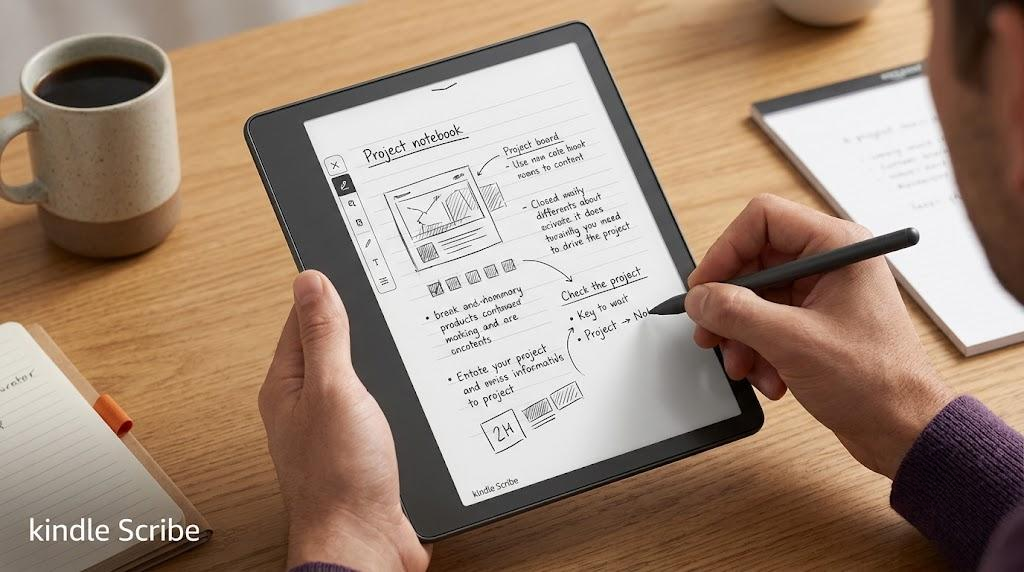
The amazon kindle scribe is a large-screen e-reader designed to combine reading and writing in a single device. It features a 10.2-inch E-Ink display that closely resembles real paper, which helps users read comfortably for long periods without eye strain. With the help of a stylus pen, users can write notes, highlight text, and interact directly with books and documents in a natural way. This makes it different from standard e-readers that only support reading.
The device works within a focused ecosystem built for productivity and distraction-free use. It allows users to access Amazon’s digital book library while also creating notebooks, annotating PDFs, and organizing handwritten notes. The amazon kindle scribe removes distractions like apps and notifications, helping users stay focused on reading and writing tasks. This combination of simplicity and functionality makes it useful for students, professionals, and writers who want a paper-like digital experience.
Key Features of Kindle Scribe
The amazon kindle scribe includes several advanced features that make it more than a traditional e-reader. One of its main highlights is the large 10.2-inch E-Ink display, which delivers a paper-like reading and writing experience. The device also supports multiple storage options and comes with a stylus pen that allows users to write directly on the screen. This makes it suitable for reading, annotating documents, and creating handwritten notes in a single device.
Another important feature is its integration with Amazon’s ecosystem, which gives users access to a vast library of e-books and documents. The amazon kindle scribe also includes notebook creation tools, PDF annotation support, and handwriting-to-text conversion features for better productivity. These tools help users stay organized while managing notes, ideas, and reading materials in one place. Its long battery life and distraction-free interface further enhance its value as a productivity-focused device.
Writing and Note-Taking Experience
The amazon kindle scribe delivers a smooth and natural writing experience that closely resembles writing on real paper. The stylus responds accurately to pressure and movement, allowing users to take handwritten notes, sketch ideas, and annotate documents with ease. The large screen provides enough space for comfortable writing, making it especially useful for long study sessions, meetings, or reading notes alongside text. Many users appreciate the simple and distraction-free environment, which helps them stay focused on writing tasks without interruptions.
The note-taking system on the amazon kindle scribe is designed to improve organization and productivity. Users can create multiple notebooks, structure their notes, and mark important sections in eBooks or PDFs. Handwriting-to-text conversion adds another layer of convenience by turning handwritten notes into digital text for easier sharing and editing. While it does not offer the advanced flexibility of full tablets, it performs well for focused writing and reading tasks, making it a strong choice for students, writers, and professionals.
Reading Performance and Display Quality
The amazon kindle scribe offers a high-quality reading experience with its 10.2-inch E-Ink display, which closely resembles real paper. This display reduces glare and eye strain, making it comfortable for long reading sessions in both indoor and outdoor lighting. The adjustable warm light feature also helps users customize brightness levels according to their environment, improving readability during day and night use. Many users consider this one of the strongest aspects of the device because it prioritizes comfort over distractions.
In terms of performance, the amazon kindle scribe delivers smooth page transitions and responsive touch interaction for navigation and highlighting. It supports a wide range of eBook formats and provides seamless access to Amazon’s digital library. The reading interface is clean and distraction-free, allowing users to focus entirely on content without notifications or apps. While it does not support multimedia features like videos or color-rich content, it excels in delivering a focused and immersive reading experience that suits serious readers and professionals.
Pros and Cons of Kindle Scribe
The amazon kindle scribe offers several strong advantages that make it appealing to readers and productivity-focused users. One of its biggest strengths is the large E-Ink display, which provides a paper-like reading and writing experience that reduces eye strain. The device also supports seamless note-taking, PDF annotation, and integration with Amazon’s ecosystem, giving users access to a vast library of digital content. Its long battery life and distraction-free interface further enhance productivity, especially for students, professionals, and writers who prefer a focused environment.
At the same time, the amazon kindle scribe has some limitations that users should consider before buying. It does not support a full app ecosystem like tablets, which limits its functionality outside reading and writing. The lack of color display also makes it less suitable for multimedia content. Additionally, while handwriting features are useful, they are not as advanced as those found in high-end tablets. Overall, the device performs best as a dedicated reading and writing tool rather than a general-purpose digital device.
Real-World Use Cases and Case Study
The amazon kindle scribe is widely used in real-world scenarios where reading, writing, and organization play an important role. Students use it for taking lecture notes, highlighting textbooks, and organizing study material in one place. Professionals rely on it during meetings to write down ideas, review documents, and annotate PDFs without carrying paper notebooks. Writers and researchers also benefit from its distraction-free environment, which helps them focus on long-form writing and reading without interruptions from apps or notifications.
In a practical case study, many users report improved productivity after switching to the amazon kindle scribe from traditional notebooks or tablets. For example, a research professional can store multiple documents, annotate them directly, and convert handwritten notes into digital text for easy sharing. This reduces the need for printing and manual organization. While results vary depending on usage habits, most feedback highlights better focus, improved organization, and a more efficient reading and writing workflow when the device is used consistently.
Is Kindle Scribe Worth It?
The amazon kindle scribe offers strong value for users who prioritize reading, note-taking, and a distraction-free digital workspace. It works especially well for students, professionals, and writers who want a single device for reading books, annotating documents, and organizing handwritten notes. Many users appreciate its paper-like display and long battery life, which make it comfortable for extended use without eye strain or frequent charging. For those who rely heavily on PDFs, eBooks, and written notes, it provides a focused and efficient workflow.
However, the value of the amazon kindle scribe depends on individual needs. Users who expect full tablet functionality, apps, or multimedia features may find it limited. It performs best as a specialized reading and writing device rather than an all-in-one gadget. Overall, it proves worth the investment for people who want simplicity, productivity, and a distraction-free environment, but it may not suit users looking for a versatile entertainment device.
Conclusion
In conclusion, the amazon kindle scribe stands out as a powerful combination of an e-reader and digital notebook designed for focused reading and writing. It delivers a smooth, paper-like experience that helps users read comfortably, take handwritten notes, and annotate documents without distractions. With its large display, long battery life, and integration with Amazon’s ecosystem, it offers a strong productivity solution for students, professionals, and writers who value simplicity and efficiency.
At the same time, the amazon kindle scribe is not designed to replace a full-featured tablet. It lacks multimedia apps and advanced entertainment functions, which limits its versatility. However, for users who want a dedicated device for reading and writing, it provides excellent performance and usability. Overall, it is a well-balanced tool that enhances productivity by keeping the experience focused, organized, and distraction-free.
FAQs
What is the Amazon Kindle Scribe used for?
It is used for reading eBooks, annotating PDFs, and taking handwritten notes using a stylus.
Does Kindle Scribe support apps like a tablet?
No, it focuses only on reading and writing and does not support third-party apps.
Can you convert handwriting to text on Kindle Scribe?
Yes, it supports handwriting-to-text conversion for easier editing and sharing.
Is Kindle Scribe good for students?
Yes, it is very useful for students who want to take notes, highlight textbooks, and organize study material digitally.
Visit for More information : Multiple Magazines