 Admin
Admin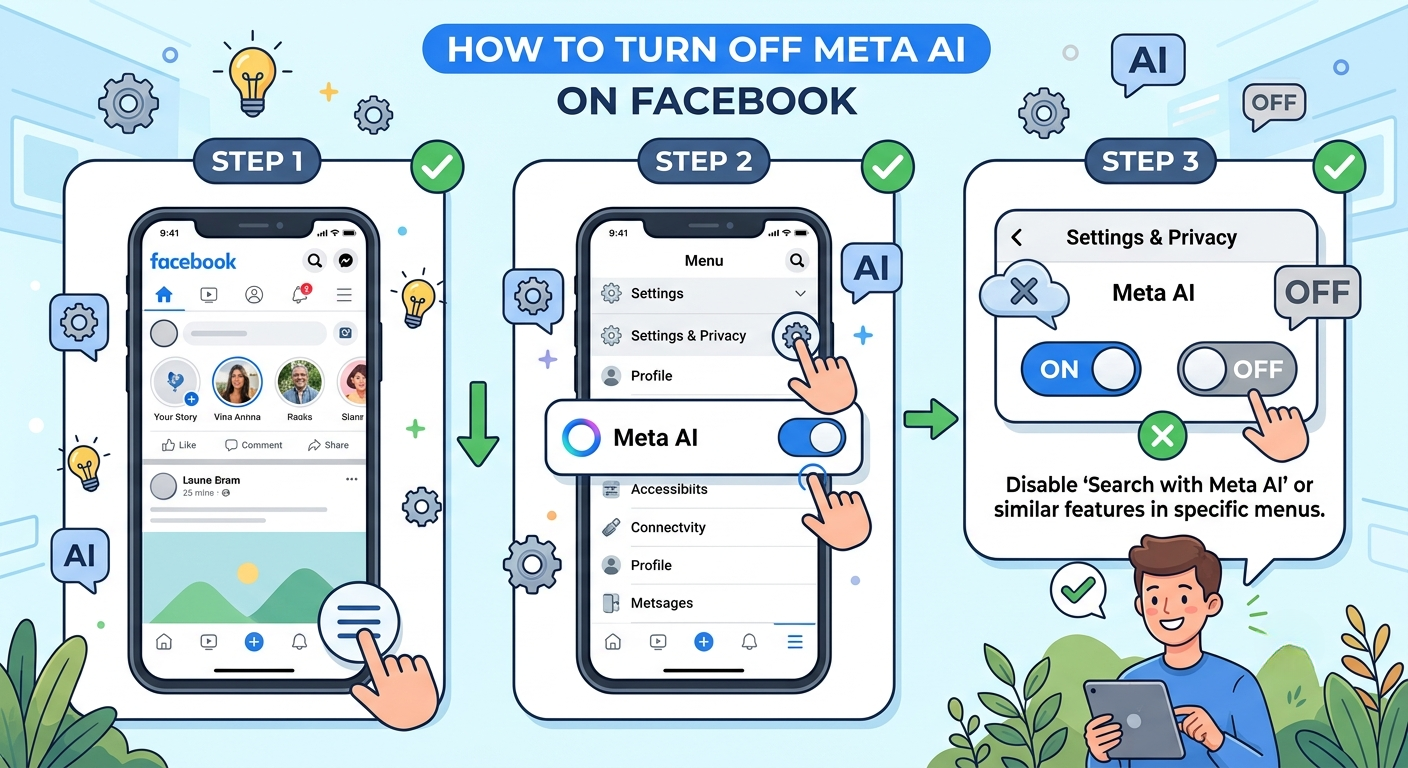
Meta developed Meta AI as an artificial intelligence assistant for Facebook and other Meta platforms to provide automated help, recommendations, and conversational features. The assistant appears in Facebook search, Messenger chats, content suggestions, and various interactive tools that answer questions and support users while they browse the platform. It uses advanced language models to understand requests, generate responses, and deliver personalized experiences based on user activity and interests. As Meta continues investing heavily in artificial intelligence, the company has expanded these AI features across its social media ecosystem and increased their visibility for millions of users worldwide.
Many Facebook users first notice Meta AI when the AI search bar, chat assistant, or automated recommendations appear inside the app. While these tools improve convenience and engagement for some users, others do not find them useful. Some people prefer a traditional Facebook experience without AI interactions, while others worry about privacy, data usage, or unwanted suggestions. Users should understand what Meta AI does and where it appears before trying to reduce or limit its presence because they can control certain features, while Meta permanently integrates others into the Facebook platform.
Why Are Users Trying to Turn Off Meta AI?
Many Facebook users have started searching for how to turn off Meta AI on Facebook because the artificial intelligence features appear automatically without giving users a clear choice during setup. The AI assistant can show up in the search bar, Messenger conversations, content recommendations, and suggested replies, making some people feel that the traditional Facebook experience has changed significantly. Users who primarily use Facebook for connecting with friends and family often find these AI additions unnecessary, especially when they interrupt regular browsing or appear in places where users expect standard search results. As Meta continues expanding AI features, the demand for greater control and customization has increased among both casual and experienced social media users.
Privacy concerns also play a major role in why people want to disable Meta AI. Some users worry about how AI systems analyze interactions, search behavior, and content preferences to provide personalized responses and recommendations. Others simply prefer to avoid AI-generated content and maintain a more manual experience while using Facebook. In addition, many users dislike the lack of a dedicated setting that completely removes Meta AI from the platform. These concerns have made the keyword how to turn off Meta AI on Facebook increasingly popular, as users search for practical solutions to reduce AI features and regain more control over their social media experience.
Can You Completely Disable Meta AI on Facebook?
At present, Facebook does not provide a universal setting that allows users to completely disable Meta AI across the platform. The AI assistant remains integrated into several Facebook features, including search tools, Messenger functions, and recommendation systems. Many users expect to find a simple on-and-off switch within the settings menu, but such an option does not currently exist. As a result, people searching for how to turn off Meta AI on Facebook often discover that only certain features can be limited or hidden rather than fully removed. The level of control available depends on the specific AI feature and the device being used.
Although complete removal is unavailable, users can still reduce their interaction with Meta AI by muting AI chats, disabling selected AI-powered features, and avoiding AI search functions when possible. These workarounds help create a more traditional Facebook experience, even though some AI elements remain active in the background. The table below shows which features can currently be controlled and which ones cannot.
| Meta AI Feature | Can It Be Disabled? | Available Option |
|---|---|---|
| Meta AI Chat | Yes | Mute the conversation |
| AI Comment Summaries | Yes | Turn off in settings |
| AI Suggested Replies | Limited | Depends on the feature |
| AI Search Bar | No | Cannot be removed |
| AI Recommendations | Limited | Reduce through preferences |
| Complete Meta AI Removal | No | No official setting |
This table demonstrates that users can manage certain AI tools, but Facebook currently offers no complete solution for turning off Meta AI entirely.
How to Mute Meta AI on Facebook and Messenger
While Facebook does not offer a complete option to disable Meta AI, users can reduce its visibility by muting the AI conversation in Messenger and limiting interactions with the assistant. This method prevents notifications and minimizes unwanted AI messages, making the platform feel less intrusive. Many users searching for how to turn off Meta AI on Facebook use this approach because it is currently the most effective way to avoid regular AI interactions. The process is simple and only requires a few steps within the Messenger application or Facebook chat settings.
Muting Meta AI does not remove the assistant from the platform, but it helps users maintain a cleaner inbox and reduces unnecessary notifications. Users can also avoid using the AI search bar and ignore AI suggestions that appear during browsing. Although these actions do not fully disable the technology, they provide greater control over the Facebook experience and allow users to interact with the platform more traditionally.
| Step | Action | Result |
|---|---|---|
| 1 | Open Facebook Messenger | Access your chats |
| 2 | Find the Meta AI conversation | Locate the AI assistant |
| 3 | Open the chat settings | View available options |
| 4 | Select the Mute option | Disable notifications |
| 5 | Choose “Until I Change It” | Keep the AI conversation muted |
| 6 | Close the chat | Reduce AI interruptions |
Quick Steps to Mute Meta AI
- Open Messenger or Facebook chat.
- Search for the Meta AI conversation.
- Tap the information or settings icon.
- Select Mute Notifications.
- Choose the longest available mute option.
- Exit the conversation and avoid further interaction.
Although these steps cannot completely remove Meta AI, they significantly reduce its presence and improve the user experience for those who prefer fewer AI features.
Which Meta AI Features Can Be Disabled?
Although Facebook does not allow users to completely remove Meta AI, several individual features can still be adjusted or disabled depending on the user’s device, application version, and account settings. Some AI tools, such as comment summaries and certain recommendation features, include optional settings that allow users to limit their visibility. These controls help users customize their Facebook experience and reduce the number of AI-generated suggestions they encounter while browsing the platform. Understanding which features can be controlled is important for anyone searching for how to turn off Meta AI on Facebook because not every AI tool operates in the same way.
Certain Meta AI features remain permanently integrated into Facebook, including the AI search experience and some recommendation systems. However, users can disable selected options that rely on artificial intelligence to summarize content, generate responses, or provide assistance. The available controls may also change as Meta releases updates, meaning users should occasionally review their settings to see whether new options become available in future versions of Facebook.
| Meta AI Feature | Available Control | User Access |
|---|---|---|
| AI Comment Summaries | Can be turned off | Settings menu |
| Meta AI Chat Notifications | Can be muted | Messenger settings |
| Suggested AI Replies | Limited control | Some conversations |
| AI Content Recommendations | Partial control | Feed preferences |
| AI Search Assistant | No control | Always available |
| AI Search Bar | Cannot be removed | Built into Facebook |
| AI Recommendations | Limited adjustments | Preference settings |
Features Users Can Control
- Mute Meta AI conversations.
- Disable AI comment summaries when available.
- Adjust feed preferences to reduce recommendations.
- Turn off certain notification categories.
- Limit interactions with AI-powered tools.
Features That Cannot Currently Be Disabled
- Meta AI search integration.
- AI search bar placement.
- Some recommendation algorithms.
- Core AI-powered platform features.
- Complete removal of Meta AI from Facebook.
These limitations explain why many users continue searching for ways to turn off Meta AI completely, even though only selected features currently offer user controls.
Privacy Concerns and User Reactions to Meta AI
Privacy concerns have become one of the main reasons users search for how to turn off Meta AI on Facebook. Many people worry about how artificial intelligence systems process searches, conversations, content preferences, and user interactions to generate personalized responses and recommendations. Although Meta states that AI tools are designed to improve user experience, some Facebook users remain concerned about the amount of information analyzed by these systems. Questions about data usage, personalization, and AI-generated suggestions have led many individuals to seek greater control over the features available on their accounts.
User reactions to Meta AI have been mixed since its introduction. Some users appreciate the convenience of AI-generated answers, smart recommendations, and automated assistance, while others believe these features make Facebook more complicated and less personal. Discussions across social media platforms show that many users would prefer an option to completely disable Meta AI. The growing demand for additional privacy controls demonstrates that users want more transparency and flexibility regarding artificial intelligence features within Facebook and other Meta applications.
| User Concern | Description | Impact on Users |
|---|---|---|
| Privacy Issues | Concerns about data processing | Increased caution |
| AI Recommendations | Unwanted content suggestions | Reduced user satisfaction |
| Search Changes | AI appears in search results | Different browsing experience |
| Lack of Control | No complete disable option | User frustration |
| Notification Overload | AI chat alerts and prompts | More interruptions |
| Personalized Responses | AI-generated suggestions | Mixed reactions |
Common User Concerns
- Limited control over AI features.
- Increased AI presence throughout Facebook.
- Questions about data processing.
- Unwanted recommendations and suggestions.
- Lack of a complete disable option.
User Opinions About Meta AI
| Opinion Type | User Response |
| Positive | Helpful for quick answers and assistance |
| Neutral | Uses AI occasionally when needed |
| Negative | Prefers a traditional Facebook experience |
| Privacy-Focused | Wants stronger controls and settings |
As Meta continues expanding artificial intelligence across its platforms, user feedback will likely influence future settings and privacy options. Many users continue requesting a dedicated feature that allows them to fully disable Meta AI and regain greater control over their Facebook experience.
Alternative Ways to Reduce Meta AI Activity
Since Facebook does not currently provide a complete option to disable Meta AI, many users rely on alternative methods to reduce how often they encounter AI features. These techniques do not remove Meta AI entirely, but they can make the platform feel less dependent on artificial intelligence. Users who want a more traditional Facebook experience can adjust notification settings, customize their feed preferences, and avoid direct interactions with AI-powered tools. These small changes help limit the visibility of Meta AI while allowing users to continue using Facebook normally.
Another effective approach is to regularly review Facebook settings after app updates. Meta frequently introduces new features, and some settings may change over time. Users can also limit AI interactions by avoiding AI search suggestions, muting Meta AI conversations, and disabling optional AI features when available. Although these methods are not permanent solutions, they provide practical ways to reduce AI activity until Facebook offers more comprehensive controls in the future.
| Method | Purpose | Effectiveness |
|---|---|---|
| Mute Meta AI Chat | Stops notifications | High |
| Disable Comment Summaries | Removes AI-generated summaries | Medium |
| Adjust Feed Preferences | Reduces suggested content | Medium |
| Turn Off Notifications | Limits AI alerts | High |
| Avoid AI Search | Reduces AI interactions | Medium |
| Review Settings Regularly | Finds new control options | Medium |
Tips to Minimize Meta AI Activity
- Mute Meta AI conversations permanently.
- Disable optional AI features in settings.
- Reduce unnecessary notification categories.
- Customize your news feed preferences.
- Avoid interacting with AI-generated suggestions.
- Keep the Facebook app updated to access new controls.
| User Goal | Recommended Action |
| Fewer AI notifications | Mute Meta AI |
| Less AI content | Adjust feed settings |
| Reduced interruptions | Turn off alerts |
| More privacy control | Review account settings |
| Traditional Facebook experience | Avoid AI features |
These alternative methods cannot completely remove Meta AI, but they help users reduce its influence and create a browsing experience that feels more familiar and less dependent on artificial intelligence.
What to Expect From Meta AI in 2026
Meta continues investing heavily in artificial intelligence, which means Meta AI features are expected to become more advanced and more deeply integrated into Facebook during 2026. New AI tools may appear in search, messaging, recommendations, content creation, and customer support features. As artificial intelligence becomes a larger part of the platform, users may see smarter suggestions, improved chat assistance, and more personalized experiences based on their activity. However, this expansion also increases the demand for stronger privacy controls and additional user settings that allow individuals to manage how AI interacts with their accounts.
Many industry experts believe Meta will eventually provide more customization options as user feedback continues to grow. Facebook users increasingly want the ability to choose which AI features they use and which ones they prefer to disable. While a complete “Turn Off Meta AI” button does not currently exist, future updates may introduce better controls, privacy settings, and AI management tools. Until then, users searching for how to turn off Meta AI on Facebook should focus on the available settings and workarounds that help reduce AI interactions.
| Expected Development | Possible Impact on Users |
|---|---|
| More AI integration | Increased AI presence |
| Smarter recommendations | More personalized content |
| Expanded AI search tools | Better search assistance |
| Additional privacy settings | Greater user control |
| New AI features | More customization options |
| Improved AI management tools | Easier feature control |
Predicted Meta AI Trends for 2026
- Greater AI integration across Facebook services.
- Improved conversational AI features.
- More personalized recommendations.
- Expanded AI-powered search functions.
- Additional privacy and control settings.
- Increased user demand for disable options.
| User Expectation | Future Possibility |
| Full AI disable option | Possible but unconfirmed |
| More privacy controls | Likely |
| Better customization | Highly expected |
| AI feature selection | Potential future update |
| Reduced AI visibility options | Possible |
As Meta develops its artificial intelligence technology, user feedback will play an important role in shaping future settings and controls. The balance between AI innovation and user choice will likely become one of the most important topics for Facebook users in the coming years.
Conclusion
Understanding how to turn off Meta AI on Facebook has become increasingly important as artificial intelligence features continue expanding across the platform in 2026. Although many users expect a simple switch that completely disables Meta AI, Facebook currently does not offer a universal setting to remove the AI assistant from search, recommendations, or other integrated features. Instead, users must rely on available options such as muting Meta AI conversations, adjusting notification settings, and disabling certain AI-powered tools where possible. These methods can significantly reduce AI interactions even though they cannot entirely remove the technology from the platform.
As Meta continues developing artificial intelligence across Facebook, Messenger, and other services, user demand for greater control is likely to grow. Many users prefer a traditional social media experience and want stronger privacy settings that allow them to decide which AI features they use. Until Meta introduces more advanced controls, the best approach is to use the available settings, stay informed about new updates, and regularly review privacy options. For now, the answer to how to turn off Meta AI on Facebook is that complete removal is not possible, but several practical methods can help limit its presence and improve the overall user experience.
| Key Takeaway | Current Status |
|---|---|
| Complete Meta AI removal | Not available |
| Mute Meta AI chat | Available |
| Disable comment summaries | Available in some cases |
| Reduce AI notifications | Possible |
| Adjust feed preferences | Available |
| Future disable option | Unknown |
FAQs
Can I completely turn off Meta AI on Facebook?
No, Facebook does not currently provide a setting that completely disables Meta AI across the platform.
Can I mute Meta AI notifications?
Yes, users can mute Meta AI conversations in Messenger to stop notifications and reduce interactions.
Does Meta AI affect Facebook search?
Yes, Meta AI is integrated into certain search features and cannot currently be removed.
Will Facebook add a turn-off option in the future?
Meta has not officially announced a complete disable option, but future updates may introduce additional user controls.
Visit for More information : Multiple Magazines